Create Temporary Email With Custom Domain
Creating a temporary email with custom domain gives you a branded, disposable address that looks professional while keeping your real inbox safe. Boomlify is one provider noted for extended email validity of two months or more. This approach lets you sign up for services, test applications, and verify accounts without exposing your personal email to spam, trackers, or data brokers.
Key Takeaways
- A temporary email with a custom domain gives you a branded, disposable inbox that passes domain validation checks generic free-mail addresses often fail.
- Custom-domain addresses stay active for 2+ months, far longer than typical shared-domain services that may purge messages after 24 hours, with no fees or limits on how many you create.
- Setting one up takes four steps: choose a provider that supports custom domains, point your domain's MX records to the service, generate the address, and refresh the inbox to receive messages.
- No registration or personal details are required, and the service doesn't retain habitual user data, keeping your real inbox and identity protected from spam.
- Developers and QA engineers use custom domains to avoid the blacklist and false-positive issues common with shared-domain temp mail during signup and verification testing.
- Scanning a QR code opens the same inbox on mobile in real time, so verification codes and OTPs stay accessible across devices without manual refresh.
Why You Need a Temporary Email with Custom Domain
A temporary email with custom domain beats a standard disposable address in two ways. The branded address passes domain validation checks that reject generic free-mail domains, and you stay in control of the inbox's lifecycle, deleting it the moment your testing or sign-up work wraps up.
Skip this protection and you lose control over who can reach you. Every form submission, newsletter signup, and app registration turns into a potential spam vector, and the hidden cost shows up later as staff hours spent digging through cluttered inboxes to filter it all out.

The Core Difference: Custom Domain vs. Shared Domain
Standard disposable email services hand out addresses on shared domains like mailss.online. That's fine for everyday privacy needs, but it falls apart the moment a service blocks known temporary-email domains outright.
| Feature | Shared Domain | Custom Domain |
|---|---|---|
| Domain reputation | Often blacklisted | Fully controlled |
| Professional appearance | Generic | Branded |
| Validation bypass | Unreliable | High success rate |
| Inbox control | Service-dependent | Full ownership |
| Address lifespan | Short | Extended (2+ months) |
A custom domain solves the blacklist problem outright. When you create temporary email with custom domain, the receiving server sees a legitimate domain with proper DNS records, not a known disposable provider.

Step-by-Step: How to Create a Temporary Email with Custom Domain
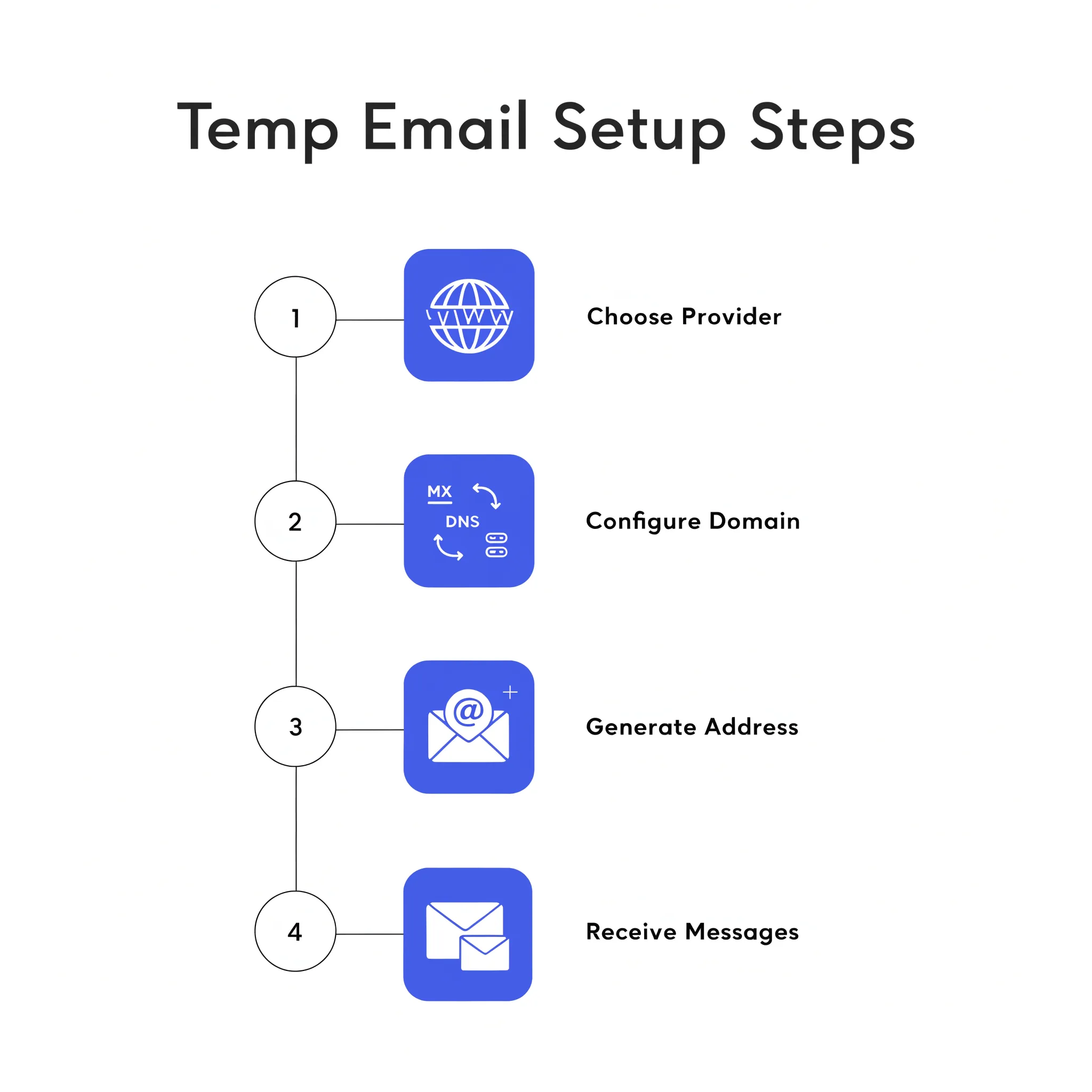
Step 1: Choose a Custom Domain Provider
Start by finding a temporary email service that actually supports custom domains. Most free tools only offer shared domains like mailss.online. Mailsac supports custom domains for QA teams, while Mailss gives you instant access with no registration required.
Step 2: Configure Your Domain
Point your domain's MX records to the temporary email service, and incoming messages route to the disposable inbox instead of your primary mail server. It takes seconds to set up, and from then on spam and unwanted messages stay out of your personal inbox entirely.
Step 3: Generate Your Address
Copy the generated email address — the service shows you the full address (for example, qa-test@yourdomain.com) the moment it's created. Drop it into any sign-up form, newsletter, or verification prompt that asks for an email.
Step 4: Receive and Manage Messages
Refresh the inbox to receive messages — most services update automatically, but a manual refresh makes sure you catch verification codes and OTPs without delay. The whole workflow stays fast, secure, and easy to use.
Real-World Use Cases for Developers and QA Engineers
Developers rely on custom-domain temporary addresses to test email verification flows, password resets, and transactional message templates. Every test run gets a fresh address, so a personal inbox never gets cluttered with test noise.
QA engineers build isolated test identities across staging environments this way. The branded domain keeps shared-domain blacklists from throwing false positives and keeps test data organized by project.
Privacy enthusiasts get to protect their primary identity while still looking professional. The temporary address takes on one-off signups, forum registrations, and download gates so the real inbox never has to.
Security and Privacy Benefits
Security is central to the service: it offers a 100% safe experience that keeps personal inboxes free from spam and malicious content. There's no need to worry about data storage either — temporary emails don't retain habitual data, so your privacy stays protected by design.
The temporary email with custom domain stays valid for extended periods, often past two months. It stays active without subscription fees, and there's no limit on how many addresses you can create.
Mobile Access and Convenience
Scan the QR code to open the same inbox on a mobile device. It updates the inbox in real time, so there's no delay and no need to hit refresh manually.
Choosing the Right Service
When selecting a provider for your temporary email with custom domain, evaluate these criteria:
- Domain control — Can you use your own domain or only subdomains?
- Inbox retention — How long do messages stay before deletion?
- API access — Does the service offer programmatic inbox management?
- Attachment support — Can you receive files for testing purposes?
- Deletion controls — Can you purge the inbox on demand?
Common Pitfalls to Avoid
Using a shared domain for critical tests — if that domain shows up on public blacklists, your verification emails might never arrive at all.
Forgetting DNS propagation time — MX record changes can take up to 48 hours to propagate globally, so set up your domain well before you actually need the address.
Ignoring inbox expiration policies — Boomlify is known for offering extended email validity of two months or more, but other services may wipe messages after just 24 hours.
The Bottom Line
A temporary email with custom domain gives you professional branding, reliable delivery, and full privacy control. You end up with a disposable address that passes validation checks, keeps spam out of your personal inbox, and stays active for months when a testing window runs long.
Mailss keeps that promise with a fast, secure, easy-to-use temporary email solution built to keep spam and unwanted emails out of personal inboxes. It's disposable, short-term email that lets people sign up for websites and services without risking exposure to spam or unwanted messages.
Whether you're a developer running automated tests, a QA engineer validating signup flows, or someone simply protecting their identity online, the custom-domain approach hands you the control and credibility a shared-domain service just can't match.
Conclusion
Mailss offers a straightforward way to manage privacy-focused email without giving anything up. Instant inbox updates, custom domain options, and solid security features come together so convenience and protection stop being a trade-off. Users keep complete control over their digital footprint while still having access to the messages that matter, all without registration, fees, or data retention worries. Temporary email stops being just a workaround here and becomes a genuinely practical privacy tool for the modern internet.
Frequently Asked Questions
How long does a temporary email with a custom domain stay active?
A temporary email with a custom domain typically stays active far longer than a standard disposable inbox, often exceeding two months of extended validity. Unlike shared-domain services that may purge an address after 24 hours, a custom-domain temp mail generator keeps the inbox live for the duration of a testing cycle or sign-up process. The address stays active without subscription fees, and there is no limit on how many addresses you can create, making it practical for QA teams and developers who need reliable, long-running test identities rather than a throwaway address that disappears mid-task.
Is it free to create a temporary email with a custom domain?
Yes. A disposable email address with a custom domain stays active without any subscription fees, and the service places no limits on how many addresses you generate. This makes it practical for developers and QA engineers who need dozens of test identities across staging environments without a recurring cost. Because the workflow also skips account creation, there is no paywall gating access to the inbox itself. The combination of free, unlimited address generation and extended validity is what separates a private domain temp mail generator from paid enterprise email-testing tools.
Do I need to register an account to get a custom domain temporary email?
No registration is required. Mailss provides instant access to a temp email generator with domain support, letting you generate a branded address immediately without creating an account, submitting personal details, or verifying identity. This no-registration approach is central to the privacy promise: since the service does not require sign-up, it also does not retain habitual user data tied to an account. Developers and privacy enthusiasts can generate a custom domain email for testing, use it, and walk away, with none of the friction or fees associated with traditional email providers.
Can I access a custom domain temporary email inbox from my phone?
Yes. Scanning the QR code displayed alongside the inbox opens the same temporary email with custom domain on a mobile device instantly, without requiring a separate login or manual setup. This mobile access updates the inbox in real time, so verification codes and OTPs arrive without delay, matching the desktop experience. For QA engineers testing mobile sign-up flows or privacy enthusiasts who switch between devices, this means the disposable address created on a computer stays fully usable and synced on a phone or tablet throughout the address's active lifespan.
Why does a custom domain help bypass email verification blocks that shared domains can't?
Shared disposable domains like mailss.online are widely known and frequently blacklisted, so receiving servers often reject or flag messages sent to them, breaking verification flows. A custom domain email for testing avoids this because the receiving server sees a legitimate domain with proper DNS and MX records instead of a recognized disposable-email provider. This gives custom domain temp mail a high success rate for validation bypass where shared-domain services are unreliable, which is why QA teams rely on it to prevent false positives from blacklist filters during account signup and email verification testing.
What happens to my messages and data after I stop using the temporary email?
Temporary emails created through the service do not retain habitual user data, which reinforces the privacy protection at the core of a disposable email address with custom domain. Users can also purge an inbox on demand rather than waiting for automatic expiration, giving full control over message lifecycle once testing or sign-up work is complete. Combined with a 100% safe experience that keeps personal inboxes free from spam and malicious content, this means nothing lingers after the job is done, unlike a personal inbox that accumulates spam and tracking data indefinitely.
What's the difference between using Mailsac and Mailss for custom-domain temporary email?
Both support custom domains, but they target slightly different needs. Mailsac supports custom domains aimed at QA teams running structured, programmatic testing workflows. Mailss instead emphasizes instant access with no registration required, prioritizing speed and simplicity for developers, privacy enthusiasts, and everyday users who want a temp email generator with domain support without setup steps. Choosing between them comes down to whether the priority is deeper QA tooling integration or the fastest possible path from zero to a working, branded disposable address with no account creation involved.