

How to Change Your Temp Mail Email
Changing a temporary email address just means finding the "Change Email" or "Change e-mail address" button on the inbox page of a service like Mailss. Pick a new alias, choose a domain such as mailss.online, and click "Update Email Address" — done. Mailss keeps this feature free, while some competitors lock address customization behind a premium subscription.
Key Takeaways
- Changing a temp mail address takes less than a minute: open the inbox, click "Change Email," pick a new alias and domain (such as mailss.online), then confirm with "Update Email Address."
- Mailss offers the temp mail change feature completely free, with no account, sign-up, or subscription required, and no cost barriers no matter how often you switch addresses.
- Once you confirm a change, the old inbox stops receiving mail immediately and any pending messages are lost, so complete verifications before switching.
- The new inbox activates instantly and starts collecting messages in real time, making it ideal for time-sensitive signup verifications.
- Using a disposable address keeps your real inbox hidden from spam and reduces phishing risk, since malicious actors never see your actual email.
- It's best practice to use a fresh disposable address for each high-value registration, like banking trials or shopping accounts, to prevent cross-contamination between services.
How to Change Your Temp Mail Address
Changing your temp mail change email address takes less than a minute, and it keeps your real inbox out of spam's reach. A disposable address self-destructs after a set time, so you decide exactly how long that inbox sticks around. Need a fresh one for a new signup? Here's how simple it is.
Why Change Your Temporary Email Address
A temp mail change keeps unwanted messages out of your personal inbox. Every time you register for a forum, download a whitepaper, or try out a service, that site can turn around and sell your address to someone else. Route it through a disposable inbox instead, and the spam lands somewhere that doesn't matter — then disappears when the timer runs out.
Mailss keeps things simple: your personal inbox stays free of spam and malicious content, and you get a disposable, short-term email whenever you need to sign up somewhere without handing over your real contact details. Your main inbox stays clean, and your identity stays yours.
Steps to Change Your Temp Mail Address
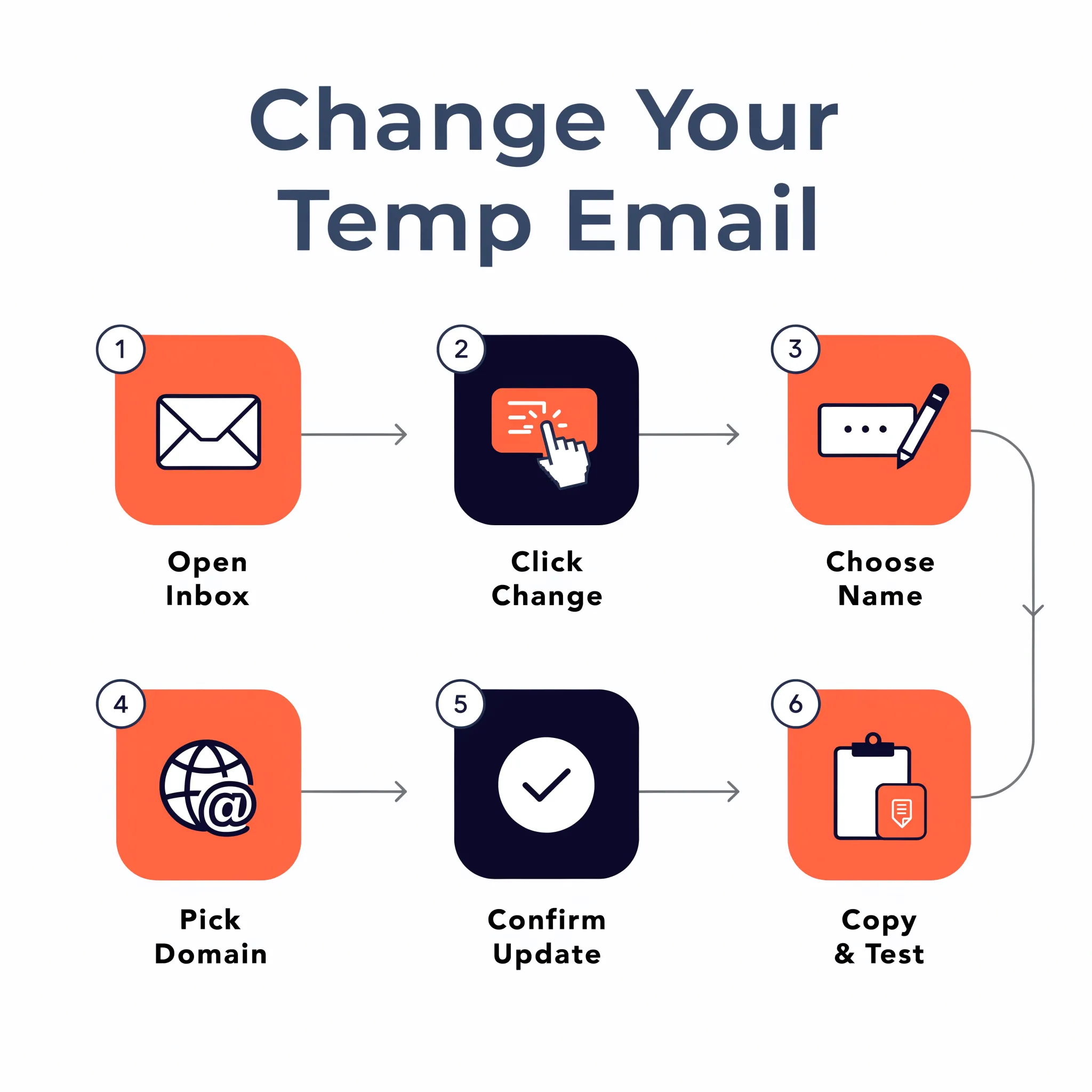
Follow these steps to generate a new disposable inbox:
- Open your current temp mail inbox. The dashboard displays your active address at the top of the page, along with options to refresh, delete, or change it.
- Click the "Change" button. This action opens the address customization panel. Some services label this option "Change Email" or "Update Email Address."
- Choose a new email name. You can type a custom alias or select a random name. The system generates a fresh address instantly.
- Pick your preferred domain. Most services offer multiple domain options, such as
mailss.onlineor other supported suffixes. Select the one that works best for you. - Confirm the update. Click "Update Email Address" or the equivalent confirmation button. Your new inbox becomes active immediately.
- Copy the new address. Use the copy button to save it to your clipboard. You will need this address for the website registration or verification process.
- Test the inbox. Send a test message or wait for the verification email to confirm the new address receives messages correctly.
What Happens After You Change Your Address
Your old inbox stops receiving new messages the moment you switch. Anything sent to the previous address is gone for good, so wrap up any pending verifications first. The new inbox starts empty and begins collecting messages in real time — no refresh needed.
Some services also let you scan a QR code to pull up your inbox on another device, which comes in handy when you're checking a verification code while juggling multiple screens. And the inbox history keeps track of what you've received, so you can look back at past emails without digging through your personal account.
When to Change Your Temp Mail Address
Change your disposable address as soon as you notice the inbox picking up unwanted content. Spam showing up in your temp inbox usually means the address has been harvested or shared around. A fresh one resets the cycle and keeps your signups clean.
It's also worth switching addresses for high-value registrations. Use a new disposable inbox for each major account you open — banking trials, shopping carts, social media profiles — so nothing overlaps. That way trackers can't easily link your activities across services.
Keeping Your Personal Inbox Safe
A temp mail service really comes down to one thing: keeping your real email separate. Your actual address stays hidden behind a throwaway one that expires on its own, so anyone with bad intentions never even sees your real contact point — which is exactly what keeps phishing risk low.
For the best protection, skip your personal email for public registrations altogether. Save your real inbox for trusted contacts and the services that actually matter. Send everything else — newsletters, downloads, one-time verifications — through a disposable address instead. Keep that up, and your primary inbox stays free of spam, and your personal data stays out of the wrong hands.

How do I change my temp email address?
Changing a temp mail change email address just means entering the email name you want and picking a preferred domain from the options on offer. Mailss handles this through a dedicated "Change Email" interface, so you can customize your disposable inbox instantly.
What steps are involved in changing the address?
- Navigate to the Change Email section — Locate the "Change Email" button or link within the Mailss dashboard, typically positioned near the current temporary address display.
- Enter a new email name — Type the desired username or alias into the provided text field. The platform accepts custom names for greater personalization.
- Select a domain — Choose from the available custom domains offered by Mailss. Each domain provides a unique endpoint for receiving messages.
- Confirm the update — Click the "Update Email Address" button to apply the change. The inbox resets immediately, ready to receive new messages at the updated address.
Is changing the temp mail address free?
Yes — the temp mail change feature is completely free on Mailss, with no subscription or registration required. Change your disposable address as often as you like, with no cost barriers ever. Thanks to real-time inbox updates, new messages just start appearing automatically the moment you switch.

What happens after I change my temp email?
Changing a temp mail change email address swaps out the old inbox right away. New messages start arriving at the updated address without delay, while the previous inbox and everything in it become inaccessible — that's just how disposable email keeps things private.
How does the inbox behave after the change?
The old inbox is swapped out for the new one entirely — messages sent to the previous address won't show up in the updated inbox. That's by design: it protects you from stumbling onto old correspondence by accident. The new inbox starts fresh, ready for verification codes or signup confirmations.
Can users save messages before changing?
Yes — save important messages to favorites before you start a temp mail change, and you'll hold onto critical information, like account credentials or confirmation links, even after the inbox resets. Otherwise, temporary emails don't retain any data, which is exactly what keeps the service private.
What about attachments and file reception?
Yes — you can receive files, documents, or images at the temporary address too, not just text-based verification codes, since the platform supports secure reception and downloading of attachments. That handling follows the same privacy protocols as the rest of the service.
Conclusion
Changing your temporary email address is a quick, straightforward habit that puts you back in control of your inbox. A disposable address keeps the clutter out while still giving you instant access to the messages that matter. Whether you're juggling multiple sign-ups or just protecting your privacy across different sites, generating a fresh address whenever you need one keeps your online presence exactly where you want it.
Frequently Asked Questions
Do I need to create an account or sign up to change my temp mail address?
No account, sign-up, or subscription is required to complete a temp mail change. Mailss offers this feature completely free of charge, and users can modify their disposable address as often as needed without any cost barriers or registration steps. Simply open your current inbox, click the "Change Email" button, choose a new alias and domain, and confirm the update. The service provides instant access with real-time inbox updates, so your new disposable email address becomes active immediately after you confirm the change, with no waiting period or account creation involved.
Can I access my temporary email inbox from another device?
Some temp mail services let you scan a QR code to open your inbox on a second device, which is useful when you need to check a verification code while working across multiple screens. The inbox also keeps a history of received messages, so you can review past emails without digging through your personal account. This makes it easy to manage a disposable email address change from a phone, tablet, or another computer without losing track of the messages your temporary inbox has already collected during that session.
What email domains are available when I set up a new temp mail address?
When you change your temp mail address, you can typically choose from several supported domains, such as mailss.online or other available suffixes offered by the service. During the update process, you select a new email name, then pick your preferred domain from the options presented before confirming the change. This domain flexibility functions like a custom temp email generator, letting you tailor the look of your disposable address for different signups while keeping the underlying inbox free, instant, and completely separate from your personal email account.
Is a temporary email address safe from spam and malicious content?
The service is designed to offer a 100% safe experience by keeping personal inboxes free from spam and malicious content. Disposable, short-term email addresses let you register for websites, forums, or downloads without exposing your real contact details, so any unwanted or harmful messages land in the throwaway inbox instead of your primary account. Because the temporary address expires on its own, this separation also reduces phishing risk, since malicious actors never gain access to your actual, real-world email address.
How quickly does a new temp mail address start receiving messages after I switch?
A new temp mail address becomes active immediately after you confirm the update. Once you click "Update Email Address" or the equivalent confirmation button, the old inbox stops receiving mail and the new inbox starts fresh, collecting messages in real time with no refresh required. This makes the process ideal for time-sensitive tasks like signup verifications, since you can send a test message or wait for a confirmation email right after completing your change temp mail address request.
Can I use the same disposable email address across multiple different website signups?
You can use one disposable address for several lower-stakes signups, such as newsletters, downloads, or one-time verifications, since the service lets you register for various websites without exposing your real contact details. However, for high-value registrations like banking trials, shopping carts, or social media profiles, it's best to create a new address for each one. This practice prevents cross-contamination between services and makes it harder for trackers to link your different accounts together.