
How to Use Mailss Temp Mail: Step-by-Step Guide (2026)
Mailss is a free temporary email service at mailss.online. It hands you a working, disposable email address in seconds — no signup, no personal details, nothing to download. Use it whenever a website demands your email first: newsletters, free trials, forums, app downloads, verification codes.
Here's the whole thing in three steps: 1. Open mailss.online — a temp address is already waiting in the email field. 2. Hit the Copy button and paste the address into the signup form. 3. Come back to the Mailss homepage — new mail lands in the inbox below within seconds. Click to read it.
That's the gist. Below is the detailed walkthrough with exactly where everything is on the page, plus the practical stuff I wish someone had told me the first time — including the one kind of account you should never use a temporary address for.
What Is Mailss Temp Mail?
Mailss is a disposable email generator. Instead of handing over your real Gmail or Outlook address to every random site that asks for one, you use a temporary address that Mailss creates for you on the spot.
The address works like a normal email address for one job: receiving mail. You can get verification codes, confirmation links, download links, and welcome emails. You can't use it as a long-term mailbox — that's the entire point. When you're done, you hit the Change button, get a fresh address, and the old one (and its inbox) is gone.
Why does this matter? Because once your real email address lands in a marketing database, it stays there. You get the newsletter you wanted plus three "partner offers" a week for the rest of your life. A temp address lets you get past the signup gate without that cost. It's not about doing anything shady — it's about not trading your permanent inbox for a one-time download.
How to Use Mailss Temp Mail: The Full Walkthrough
Step 1: Open Mailss and Get Your Address
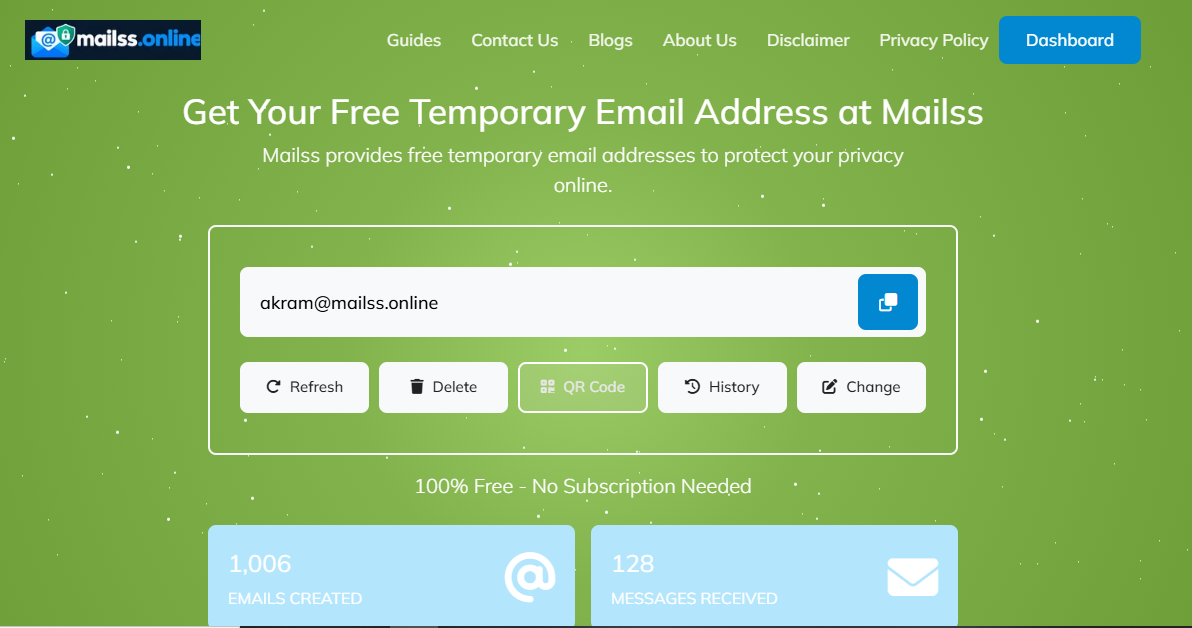
Go to mailss.online. You don't need to click anything to get started — the moment the homepage loads, there's already a randomly generated email address sitting in the email field at the top of the page. That's yours to use right now.
Take a second to look at the page layout: the address field at the top, the inbox directly below it. No dashboard, no settings page, no account menu. That simplicity is the whole product.
Tip: Keep this tab open while you do your signup elsewhere. You'll be switching back here to check for incoming mail, and it's much easier if the tab is already sitting there.
Step 2: Copy the Address
Next to the email field, you'll see a Copy button. Click it and the full address lands on your clipboard. That's it — no selecting text, no dragging across the field, no accidentally missing a character.
If you prefer doing it manually, you can select the address in the field and copy it with Ctrl+C (or Cmd+C on Mac). But the Copy button exists so you don't fumble it — email addresses are unforgiving, and one wrong character means the verification email goes nowhere.
Step 3: Paste It Into the Signup Form
Now go to the site you're signing up for and paste the Mailss address into its email field, exactly like you'd use your real address. Fill out the rest of the form normally and submit.
A few things worth knowing at this stage:
- Most sites accept it without blinking — newsletters, forums, free trials, download gates, Wi-Fi splash pages.
- A few sites block disposable addresses. If a form rejects it ("temporary emails not allowed"), that's the site's policy, not a Mailss problem. Hit Change for a brand-new address and try again — a different address sometimes gets through.
- Don't close the Mailss tab yet. The verification email is on its way.
Step 4: Wait for the Email and Read It
Switch back to your Mailss tab. New messages appear in the inbox section below the address field, usually within a few seconds to a couple of minutes. You don't need to refresh the page — the inbox updates on its own.
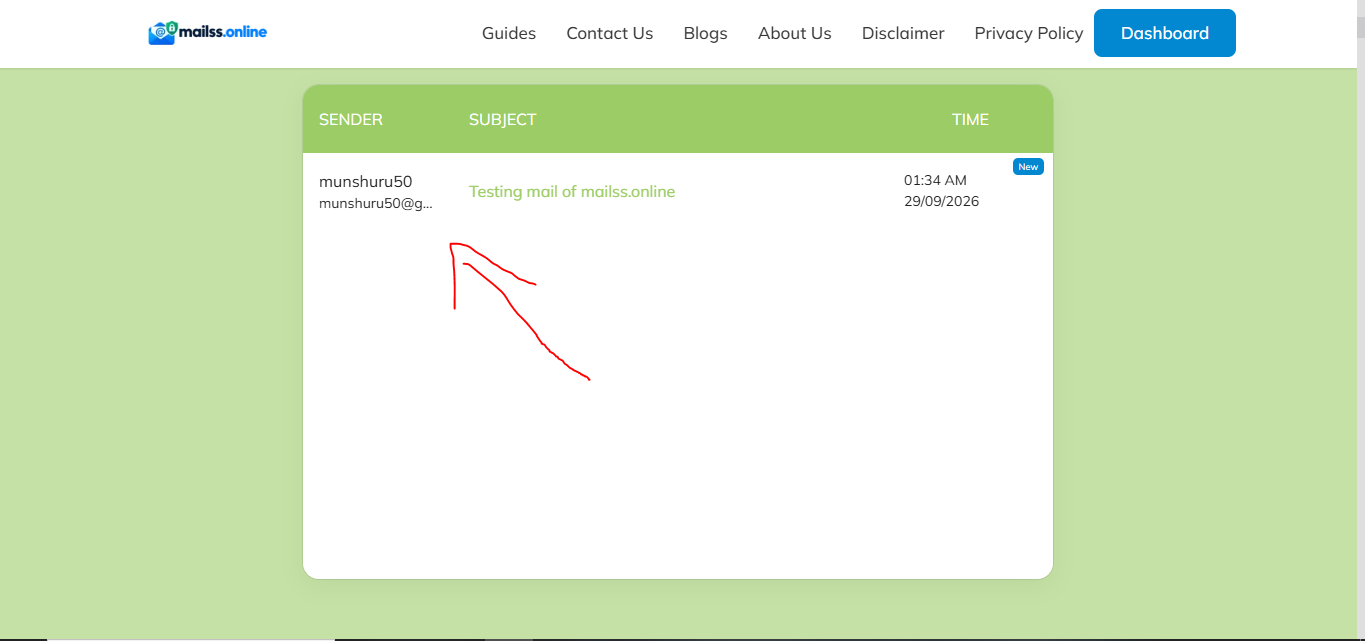
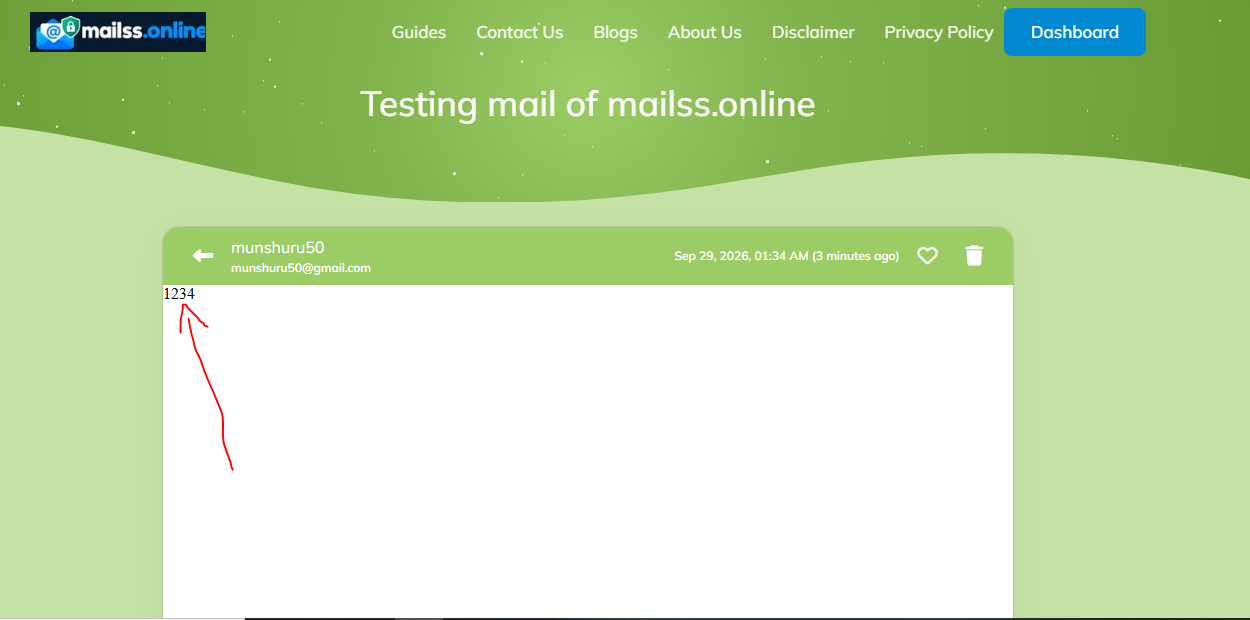
Click on the email to open it and read the full contents. What you're looking for depends on the signup:
- A verification code (typically 4–6 digits) — copy it and paste it back into the signup form.
- A confirmation link — click it to verify your address. It'll open in a new tab and complete the signup.
- A download link or login details — grab whatever you came for.
What if nothing arrives? Give it a full 2–3 minutes first — some senders are slow. Then check these, in order: the address you pasted matches your Mailss address exactly; the site actually sent something (some flows need an extra step first); the site doesn't block disposable domains. If all else fails, hit Change for a fresh address and sign up again. In my experience the email lands within a minute the vast majority of the time.
Step 5: Change or Delete the Address When You're Done
Once you've got what you came for — the verification is done, the download is downloaded, the trial is started — you're finished with that address. Click the Change button next to the email field and Mailss will generate a completely new address, replacing the old one.
This is the step people skip, and it's the one that actually protects you. The old address and its inbox are left behind — any future spam or marketing blasts sent to it go into a void instead of your real inbox. That's the entire value proposition of temp mail, and it only works if you rotate the address when you're done.
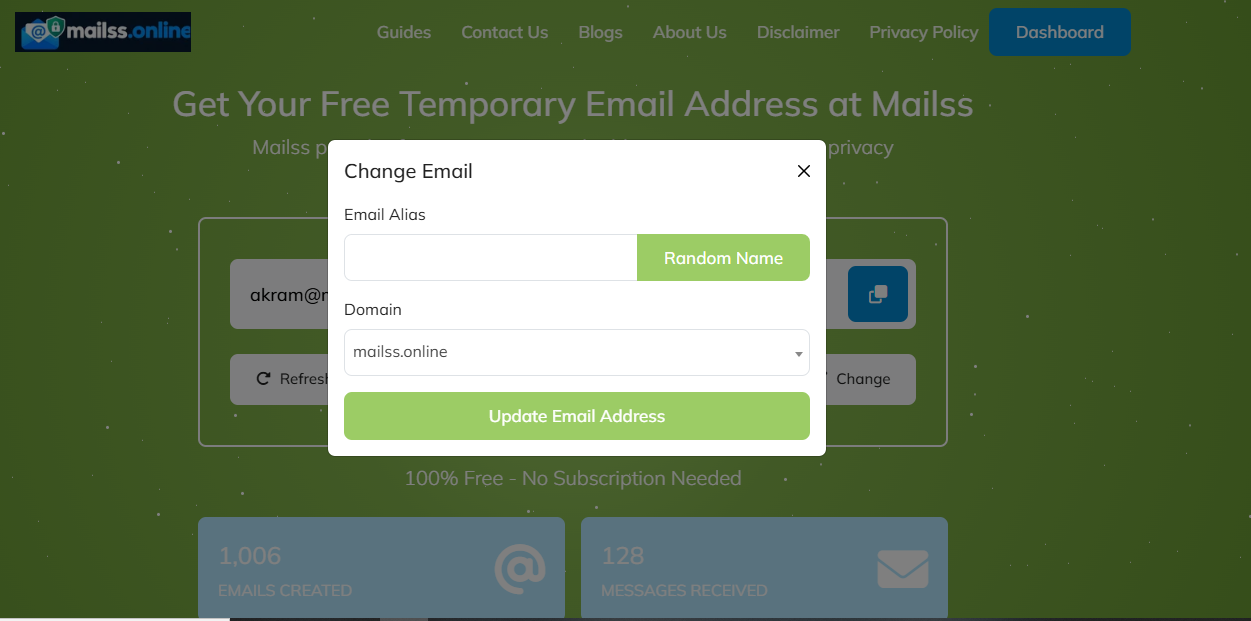
There's no delete button because there's nothing to delete — no account, no stored profile. Changing the address is deleting it, for all practical purposes.
Key Features of Mailss
Here's what you're actually getting, minus the marketing fluff:
- Instant addresses, no signup. The address exists the moment the page loads — no account, no name, nothing tying it to you.
- One-page workflow. Address field, Copy button, Change button, inbox — all on the homepage.
- Copy and Change built in. One-click copying avoids typos; one-click rotation gives you a fresh identity whenever you want one.
- Fast inbox. Mail typically shows up within seconds, which matters when you're staring at a verification screen with a countdown timer.
- Free with no real limits. Signing up for five different trials in an afternoon? Five different addresses, no problem.
- Nothing to install. Runs entirely in the browser, desktop or mobile. No app, no extension.
Practical Tips: When Temp Mail Is Perfect (and When It's a Terrible Idea)
Great uses for a Mailss address
- Newsletters you want to sample. Read a few issues; if it's not worth it, abandon the address instead of hunting for the unsubscribe link.
- Free trials. Get the trial without the follow-up drip campaign when it expires.
- Forum and community signups. Plenty of forums need email verification for an account you'll rarely revisit.
- Gated downloads. Ebooks, templates, tools — the classic "enter your email to download" gate.
- App and game registrations. Trying something for an evening? It doesn't need your real inbox.
- Public Wi-Fi logins. Cafes and airports that demand an email for access get a temp address.
- One-off verification codes. Any single code you need once and never again.
Never use temp mail for these
This is the important part, so read it carefully:
- Banking, payment apps, or anything involving money. If you lose access to the address, you lose access to transaction alerts, receipts, and dispute communications.
- Password recovery for important accounts. This is the big one. If your main email, social media, or work accounts use a temp address for recovery and you lose that address, you can get permanently locked out. Always use a real, permanent address for account recovery.
- Accounts you plan to keep. If you'll still care about this account in six months, it deserves your real email.
- Two-factor authentication. 2FA codes sent to an address you no longer control mean you're locked out the next time you log in from a new device.
- Orders, bookings, or anything with a refund. Order confirmations, shipping updates, and refund correspondence all go to the signup email. Use a real one.
The rule of thumb is simple: if losing the address would cause you a real problem, don't use a temp address. Temp mail is for the disposable stuff — the signups you'd happily forget about tomorrow.
FAQs
Is Mailss temp mail really free?
Yes. Generating addresses, receiving emails, and rotating to new addresses are all free, with no account required. There's no premium tier gating the core functionality — the address generator and inbox on the homepage are the product.
Do I need to create an account to use Mailss?
No. That's one of the main reasons to use it. You open mailss.online, an address is already generated for you, and you start using it immediately. There's no username, no password, and no profile linking your activity together.
How long does a Mailss email address last?
Treat every Mailss address as short-lived. It's designed for one-off signups and verifications, not as a mailbox you return to next week. If you need to receive something important later, use your real email address instead. When you're done with a temp address, hit the Change button and move on.
Why didn't my verification email arrive?
The most common causes, in order: you didn't wait long enough (give it 2–3 minutes), the address was copied incorrectly into the signup form, the site blocks disposable email domains, or the sender is just slow. Double-check the address matches exactly, and if all else fails, generate a fresh address with the Change button and try the signup again.
Can I send emails from my Mailss address?
Mailss is built for receiving, not sending. The workflow is: get an address, use it to sign up somewhere, read what comes back. If you need to send mail, use your regular email provider.
Is using a temporary email address legal and safe?
Yes, using a disposable address for signups is perfectly legal — you're simply choosing which inbox receives a site's emails. It's a mainstream privacy practice. Just don't use temp addresses to deceive anyone or to evade a site's rules where you've agreed not to (some services explicitly prohibit disposable emails in their terms — in that case, respect their policy).
A Final Note
Temporary email is one of those tools that seems almost too simple until you realize how much inbox clutter it prevents. The whole workflow — open the page, copy the address, paste it, read the mail, change the address — takes under a minute once you've done it twice. Make it a habit for every throwaway signup, and your real inbox stays clean for the mail that actually matters.
M
Written by
Munshuru
Munshuru is the creator of Mailss, a free temporary email service. Based in Kahror Pakka, Pakistan, he writes practical, tested guides on email privacy and avoiding spam — everything here is tried on the actual tool first.